Chat with your scanned documents.
Scan a contract, invoice, or stack of notes with your phone — then just ask it questions. ScannerFlow reads the pages and answers from what you actually scanned.
Free to download · Android · Free to try
What it does
Ask your documents, get real answers
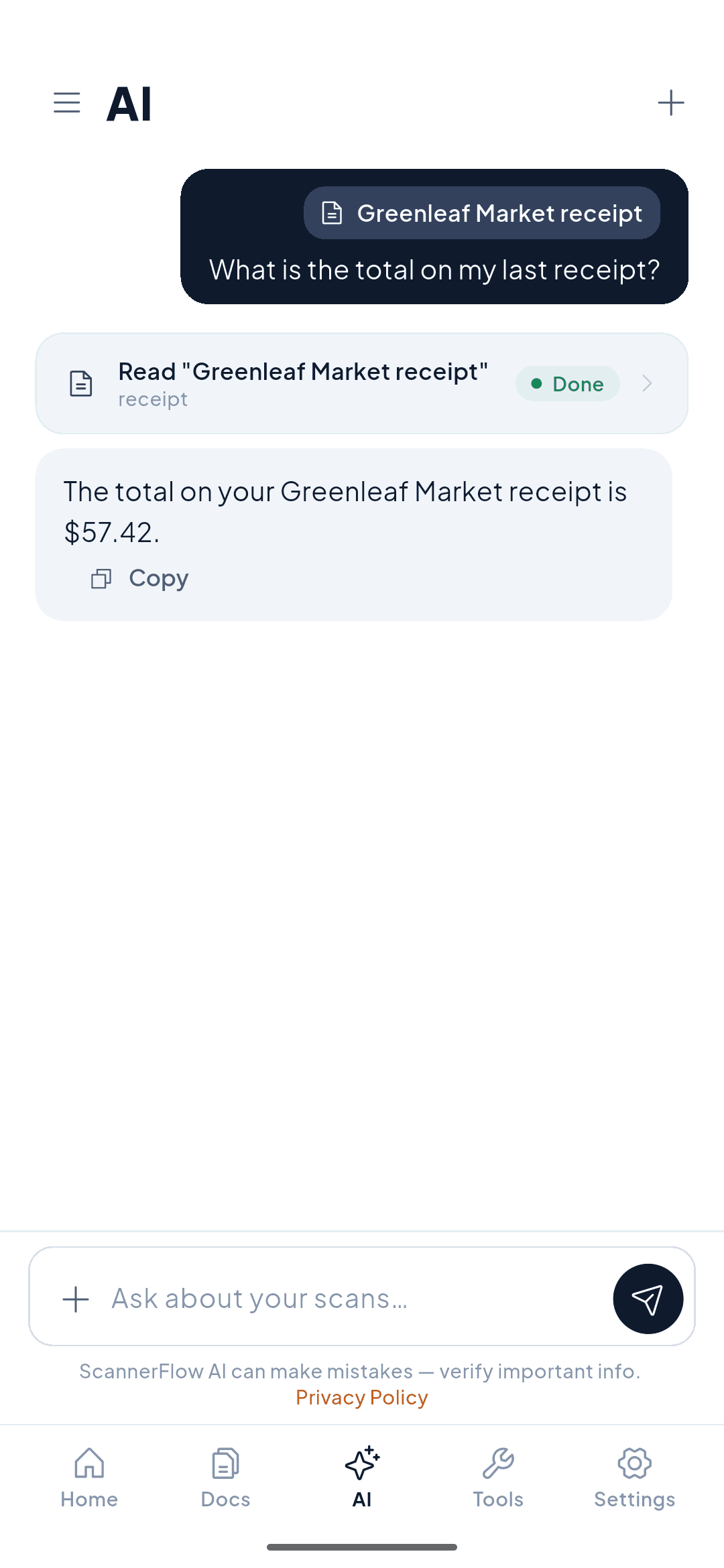
Instead of scrolling a 40-page PDF to find one number, you ask for it. ScannerFlow's AI tab is a chat over the documents you scan or import — attach one, type a question, and the answer comes straight from the pages.
Find the answer fast
“What’s the total?” “When does this expire?” Skip the scrolling — ask and get the exact line.
Understand the fine print
Ask the AI to explain a clause in plain language, or point out the cancellation or refund terms.
Pull out the details
Ask for dates, names, amounts, or action items and get them listed back to you, ready to copy.
How it works
Three steps to a conversation with your PDF
- 1
Scan the document
Capture one page or a full multi-page document. ScannerFlow auto-crops and sharpens the text so it reads cleanly.
- 2
Type your question
Open the AI tab and attach the document with the + button in the composer, then ask anything — a fact, a summary, an explanation. Plain language, just like texting.
- 3
Get the answer
ScannerFlow replies using the content of your scan. Ask a follow-up to dig deeper, or copy the answer to use elsewhere.
Why ScannerFlow
Chat that's grounded in your scans
Answers from your document
The AI reads the pages you scanned, so replies reflect your actual contract or invoice — not a generic answer.
Scan and ask in one app
Capture and chat on the same phone, in one flow. No exporting to a desktop or pasting into a separate chatbot.
Plain-language questions
No special syntax. Ask the way you'd ask a person, and ask follow-ups to keep the conversation going.
Your documents, your control
Scans are backed up to encrypted cloud storage (Google Cloud / Firebase) — encrypted in transit and at rest — and OCR runs on-device. To answer, the document’s text is sent to our AI provider, OpenAI. Keep, share or delete documents whenever you want.
Real use cases
What people ask their documents
Contracts & agreements
“What’s the notice period?” “Can I cancel early?” Get the clause that matters without reading the whole thing.
Invoices & receipts
“What’s the total including tax?” “When is payment due?” Pull the numbers without squinting at the page.
Study material
Scan lecture notes or a textbook chapter and quiz yourself — ask the AI to explain a concept or list the key points.
Letters & forms
“What is this letter asking me to do?” Turn a confusing form into a clear next step.
Start here
- ScannerFlow for Android
Scan, extract text, sign, convert and ask AI — one tap per job.
- AI document scanner
Scan a page, then ask AI to summarize, translate or find a detail.
- ID scanner to PDF
Front and back of an ID card on one A4 page, ready to send.
Frequently asked questions
Can I chat with a scanned PDF?
Yes. ScannerFlow reads the text on your scanned pages, so you can ask the document questions in plain language and get answers pulled from what you scanned — even if the original was a photo of paper.
What kinds of questions can I ask?
Anything the document can answer: "What's the total on this invoice?", "When is the payment due?", "Summarize the cancellation clause", "Which section covers returns?", or "List the action items." The AI answers from the pages you scanned.
Does it work with documents I already have as PDFs?
Yes. Tap “Import a PDF” on the Home tab (or share the PDF into ScannerFlow from any app); it lands in Docs. Then open the AI tab, attach it with the + button and ask. Scans and imported PDFs work the same way.
Is chatting with documents free?
ScannerFlow is free to download, with 3 free scans and 10 free AI messages a day. Premium ($5.99/week after a 3-day free trial) lifts the daily caps. Answers are generated by our AI provider, OpenAI, from the text of your document.
Get ScannerFlow
Stop scrolling. Start asking.
Download ScannerFlow, scan a document, and have a conversation with it on your phone.
Free to download · Android · Free to try
Part of ScannerFlow’s AI document scanner. See also summarize documents and scan and translate.