Scan any document to a clean PDF
ScannerFlow turns the camera in your pocket into a full document scanner. Auto-crop, enhance, and stack pages into a sharp, shareable PDF — no printer-scanner required.
Free to download · Android · Free to try
What it does
A pocket scanner that makes real PDFs
ScannerFlow is built for the moment you have a piece of paper and need a digital copy that looks professional — not a crooked, shadowy phone photo.
Auto edge detection
The camera finds the page outline and straightens the perspective so every scan is square and crop-perfect.
Scanner-grade enhancement
Filters remove background, even out lighting, and sharpen text so a photo reads like a flatbed scan.
Multi-page PDFs, free
Add, reorder, retake and delete pages, then save the whole document as one tidy PDF. Import an existing PDF or turn photos into one, too.
How it works
The scan-to-PDF workflow in four steps
The whole flow happens on your phone — capture, clean up, and export without a desktop.
- 1
Tap “Scan a document” on the Home tab
The camera opens immediately. Lay the document on a flat, contrasting surface for the cleanest capture.
- 2
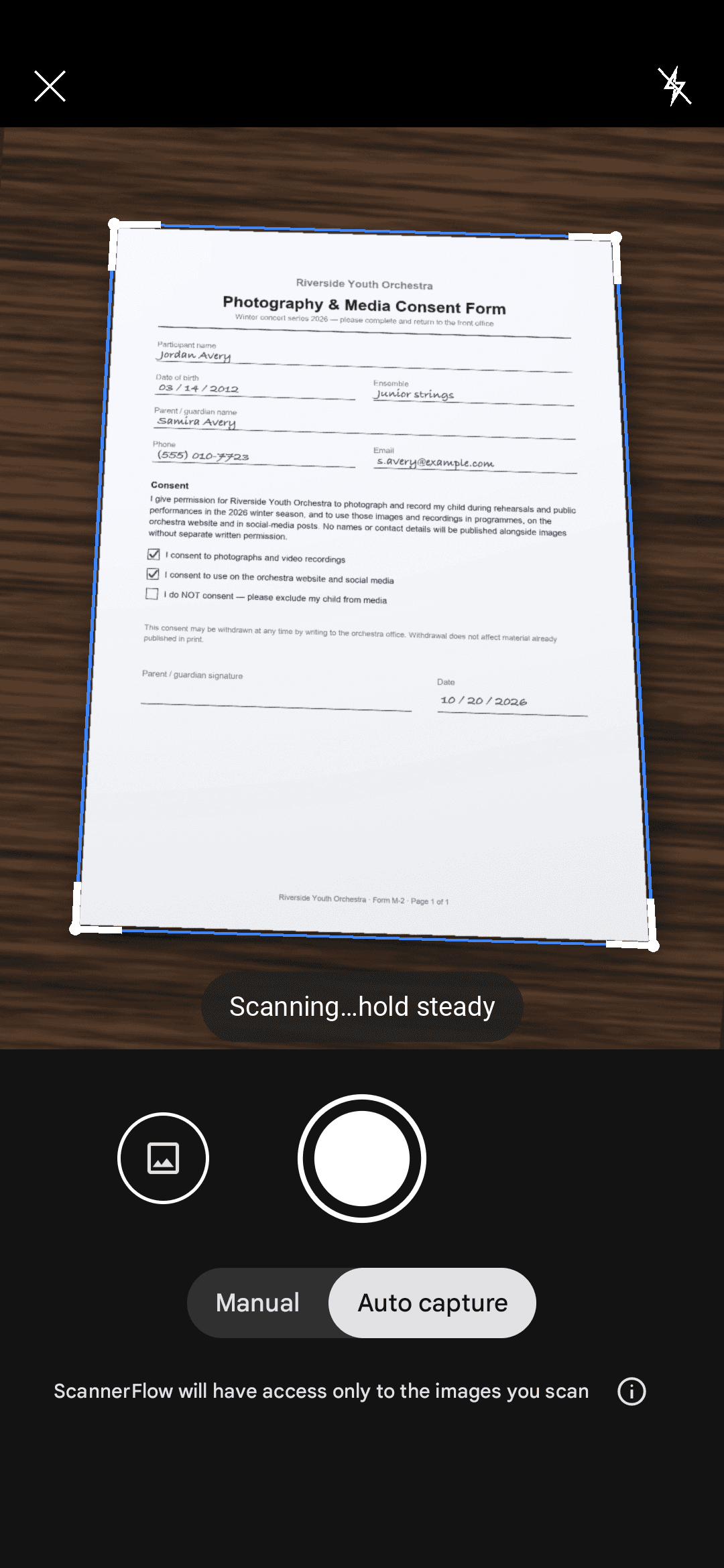
Let auto-crop find the edges
ScannerFlow detects the page borders in real time and straightens the perspective. Nudge the corners manually if you want a precise crop.
- 3
Enhance and add pages
Pick a filter — Auto, B&W or Original — to sharpen the text. Keep scanning to stack as many pages as you need into one file; reorder, retake or delete any page.
- 4
Save as PDF and share
Tap Save, name the file and choose PDF. Share it to email, Drive or any messaging app. Next steps from the same screen: Extract text, Sign, Convert to Word (Premium) or Ask AI.
Why ScannerFlow
The scan-to-PDF app that gets out of your way
AI tab built in
More than a scanner — attach the PDF in the AI tab and ask for a summary, a translation or a detail.
Clean & easy
A flat, focused interface. Open the app, scan, save. No clutter, no learning curve.
Mobile-first
Designed for the phone in your hand, so a great-looking PDF is always seconds away.
Accurate output
Precise edge detection and on-device OCR mean your PDFs look right and their text stays readable.
Use cases
What people scan to PDF with ScannerFlow
Contracts & forms
Sign-ready PDFs of agreements, leases, and intake forms without a printer-scanner.
Receipts & invoices
Turn paper receipts into tidy PDFs for expense reports and bookkeeping.
School & study notes
Digitize handouts and notebook pages into one searchable PDF per class.
ID & official documents
Scan passports, licenses, and certificates into crisp PDFs for applications.
Whiteboards & meetings
Capture a whiteboard and flatten it into a readable, glare-free PDF.
Books & articles
Scan pages from books and magazines into a clean multi-page PDF to read later.
Need editable text instead of a flat PDF? Use image to text to run OCR, or browse the full document scanner feature hub. New to it? Our guides walk through scanning to PDF on Android and shrinking a scanned PDF that is too big to email.
Start here
- ScannerFlow for Android
Scan, extract text, sign, convert and ask AI — one tap per job.
- AI document scanner
Scan a page, then ask AI to summarize, translate or find a detail.
- ID scanner to PDF
Front and back of an ID card on one A4 page, ready to send.
Scan-to-PDF FAQ
How do I scan a document to PDF on my phone?
Open ScannerFlow and tap “Scan a document” on the Home tab. Point your camera at the page: the app detects the edges, captures the page and applies a filter. Add more pages if you need a multi-page file, then tap Save and choose PDF. Your scan is ready to share in seconds and is backed up to your encrypted cloud library.
Is ScannerFlow free to use?
ScannerFlow is free to download. You get 3 free scans and 3 free text extractions a day, multi-page PDFs included; free exports carry a small “Scanned with ScannerFlow” watermark. Premium ($5.99/week after a 3-day free trial; monthly and annual plans available) lifts the daily caps, removes the watermark and adds Word/Excel conversion, password protection and full-resolution cloud backup.
Will the scanned PDF look like a flatbed scan?
Yes. ScannerFlow corrects perspective, removes the background, sharpens text, and evens out lighting so a photo of a page comes out looking like it was run through a desktop scanner — no shadows, no skew, no curled corners.
Can I scan multiple pages into one PDF?
Yes, and it is free. Keep capturing to add pages, reorder them, retake or delete any you do not want, then save the whole stack as one multi-page PDF. “Photos to PDF” on the Home tab does the same with pictures already in your gallery.
Are scanned PDFs searchable?
Tap “Extract text” on the Home tab or on any saved document: ScannerFlow runs OCR on your phone, the text becomes searchable in the Docs tab, and you can copy or share it. Free users get 3 text extractions a day. If you mainly need editable text, see the image-to-text page.
Does it work on Android?
Yes. ScannerFlow is an Android app on Google Play. There is no iPhone version yet.
Make your first clean PDF today
Download ScannerFlow and turn the next piece of paper on your desk into a sharp, shareable PDF.