Document scanner app for Android
ScannerFlow is a document scanner in your pocket. Capture any page, clean it up automatically, and then do the job you actually came for: a PDF, the text, an ID card on one page, a signature, a Word file, or an answer from the AI tab.
Free to download · Android · Free to try
What it does
One scanner for every kind of paper
Whether it is a contract, a receipt, an ID, or a page from a book, ScannerFlow captures it cleanly and lets you decide what it becomes — a PDF, plain text, or an AI conversation.
Auto-crop & enhance
Edge detection and filters straighten and sharpen every page so scans look professional, not like phone photos.
PDF, text or Word
Save a clean PDF, tap Extract text for copyable text, or convert to an editable .docx (Premium).
AI tab built in
Attach a scan and ask: summarize, translate, find the total, fill a form, rename or file it.
How it works
Scan a document in four steps
The same simple flow works for every document type.
- 1
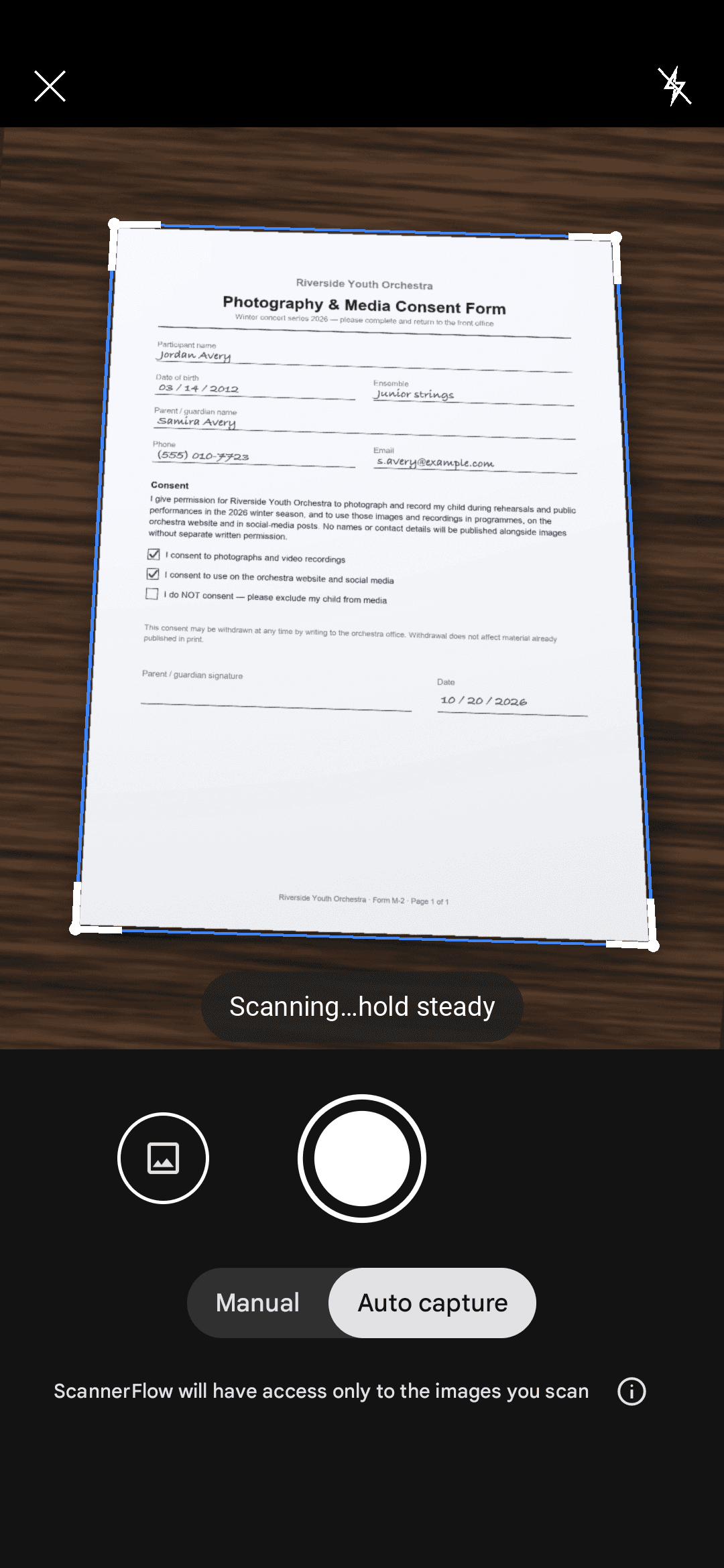
Tap “Scan a document” on the Home tab
The camera opens straight away — no mode picker. Point it at the page on your desk.
- 2
Capture with auto-crop
ScannerFlow detects the page edges and straightens the perspective so the scan comes out square and clean.
- 3
Clean up and add pages
Pick a filter (Auto, B&W or Original), add more pages if needed, reorder or retake any of them.
- 4
Save, then pick the next job
Save as PDF or JPG and share it anywhere. From the document: Extract text, Sign, Convert to Word (Premium) — or open the AI tab and attach it.
Explore
Everything you can scan
ScannerFlow is one app with a feature for every job. Jump into the workflow you need.
Scan to PDF
Capture any document and export a sharp, multi-page PDF that looks like a flatbed scan.
Image to text (OCR)
Tap Extract text: copyable text from a photo or scan, recognised on your phone.
AI document scanner
Ask questions about your scans, summarize them, and let AI do the reading.
Scan receipts
Digitize receipts into tidy files for expenses, taxes, and bookkeeping.
Scan ID cards
Front and back of an ID card on one A4 page — the format offices ask for.
Scan books
Turn pages from books and articles into a clean multi-page document.
Why ScannerFlow
A document scanner people actually enjoy using
AI-native
Ask the AI tab about any scan — summaries, translations, totals, due dates — and let it rename or file documents for you.
Clean & easy
A flat, focused design. No clutter, no menus to hunt through — just scan and go.
Mobile-first
Built for the phone camera, so a great scan is always a tap away, wherever you are.
Accurate output
Reliable edge detection and on-device OCR keep your scans crisp and their text readable.
Start here
- ScannerFlow for Android
Scan, extract text, sign, convert and ask AI — one tap per job.
- AI document scanner
Scan a page, then ask AI to summarize, translate or find a detail.
- ID scanner to PDF
Front and back of an ID card on one A4 page, ready to send.
Document scanner FAQ
What is a document scanner app?
A document scanner app uses your phone camera to capture paper documents and turn them into clean digital files — usually PDFs or images with recognized text. ScannerFlow handles the capture, edge detection, enhancement and export, and adds the jobs that follow: extract text, scan an ID card onto one page, sign, convert to Word, and ask AI about the document.
Do I need a physical scanner?
No. ScannerFlow replaces a flatbed or sheet-fed scanner for everyday documents. The camera plus auto-crop and enhancement produces a result that looks like a desktop scan, with no extra hardware.
What can I scan with ScannerFlow?
Documents, contracts, receipts, ID cards, passports, business cards, book pages, slides, handwritten notes, whiteboards and QR codes. Export to PDF or JPG, extract the text, convert to Word (Premium), or ask the AI tab to summarize or translate.
Is ScannerFlow free?
ScannerFlow is free to download: 3 free scans and 3 free text extractions a day, multi-page scanning included, with a small “Scanned with ScannerFlow” watermark on free exports. Premium ($5.99/week after a 3-day free trial; monthly and annual plans available) lifts the daily caps, removes the watermark and adds Word/Excel conversion, password protection and full-resolution cloud backup.
Does it work on Android?
Yes — ScannerFlow is an Android app, free on Google Play. There is no iPhone version yet.
Are my scans private?
Capture, enhancement and text recognition run on your phone. Every scan is then backed up automatically to encrypted cloud storage (Google Cloud / Firebase), encrypted in transit and at rest, so a lost phone does not mean lost documents. AI features send the document’s text to our AI provider (OpenAI) to answer. No ads, and we never sell your data.
Put a document scanner in your pocket
Download ScannerFlow and scan your next document into a clean PDF or editable text in seconds.