Image to text: turn a photo or scan into copyable text
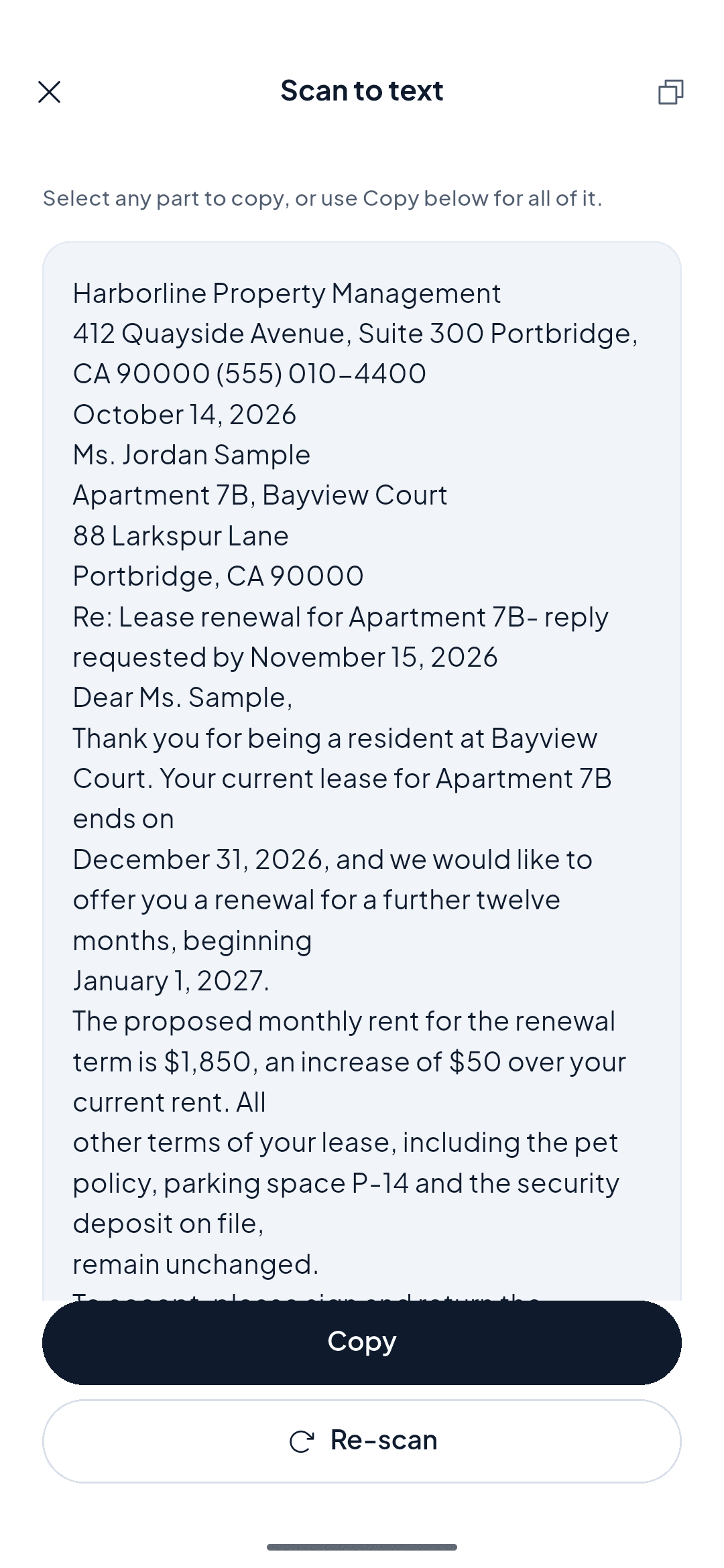
Tap Extract text on ScannerFlow's Home tab. OCR runs on your phone and the words come back with Copy and Share buttons — no retyping. 3 free extractions a day.
e.g. a business card → contacts
Free to download · Android · Free to try
What it does
OCR that lives in your pocket
Optical character recognition (OCR) reads the printed and typed words inside an image and converts them into real, selectable text — no manual typing.
On-device recognition
Text is recognised directly on your phone with Google ML Kit, so extraction works offline and is fast.
Copy or share
The recognised text is selectable, with Copy and Share buttons to send it wherever you need it.
Searchable in Docs
The original stays in your library and its text is searchable, so the words stay findable long after you scan.
How it works
From photo to text in four steps
Clean the image first, then extract — that order is what makes the recognition accurate.
- 1
Tap “Extract text” on the Home tab
The camera opens directly. Or long-press the tile to choose a document you already saved, or tap Extract text on any document in Docs.
- 2
Capture the page
Edge detection crops and straightens the page. Even light and a flat page give OCR the best chance at every letter.
- 3
OCR runs on your phone
ScannerFlow recognises the words on-device with Google ML Kit — no upload for this step — and shows them in a selectable text view.
- 4
Copy or share
Tap Copy or Share to send the text to a note, email or document. The scan stays searchable in Docs, and you can ask the AI tab about it.
Why ScannerFlow
The image-to-text app built for accuracy
AI tab next door
Beyond plain OCR — attach the scan in the AI tab and ask for a summary or a detail, or convert it to Word (Premium).
Clean & easy
Scan, extract, copy. The interface stays out of the way so you get to the text fast.
Mobile-first
OCR designed for the phone camera, with auto-crop and enhancement built into the capture.
Accurate output
Perspective correction and contrast filters sharpen characters before recognition for stronger results.
Use cases
What people extract text from
Copy text from a printout
Lift paragraphs off a paper handout straight into a document without retyping.
Digitize receipts
Pull amounts and merchant names out of receipts for expenses and records.
Quote from books
Capture a passage from a book or article and paste it where you need it.
Business card details
Extract names, phone numbers, and emails from a card into your contacts.
Forms & labels
Read serial numbers, codes, and form fields without manual transcription.
Whiteboard notes
Turn a photo of a meeting whiteboard into text you can clean up and circulate.
Want a flat document instead of raw text? Scan to PDF. Or explore the full document scanner feature hub.
Start here
- ScannerFlow for Android
Scan, extract text, sign, convert and ask AI — one tap per job.
- AI document scanner
Scan a page, then ask AI to summarize, translate or find a detail.
- ID scanner to PDF
Front and back of an ID card on one A4 page, ready to send.
Image-to-text FAQ
How do I extract text from an image?
Tap “Extract text” on ScannerFlow’s Home tab, point the camera at the page (or long-press the tile to pick a saved document). OCR runs on your phone and the recognised text appears with Copy and Share buttons. Free users get 3 text extractions a day; Premium lifts the cap.
Does OCR work offline?
Yes. Text recognition runs on-device with Google ML Kit, so you can convert an image to text without a connection. Saved scans are backed up to encrypted cloud storage once you are online, and the AI tab (which does need a connection) can then answer questions about them.
How accurate is the text recognition?
Accuracy is high on clean, well-lit printed text. ScannerFlow first straightens and enhances the image, which sharpens characters and improves results. Good lighting and a flat page give the most reliable extraction.
Can it read handwriting?
OCR is optimized for printed and typed text. Neat block handwriting can often be recognized, but cursive and messy notes are less reliable. For typed documents and printed pages, results are strong.
What languages are supported?
ScannerFlow recognizes a wide range of Latin-script languages and several others. For best results, scan one language at a time with clear, high-contrast text.
Can I save the extracted text as a file?
Yes. After extraction, Copy puts the text on the clipboard and Share sends it to any app. The scan itself stays searchable in the Docs tab. Need an editable file rather than plain text? Convert to Word (Premium) makes a .docx.
Stop retyping. Start extracting.
Download ScannerFlow and pull editable text out of your next photo or scan in seconds.